Well, I would request the users to use these following tools and extensions first to stay safe from ads and malware after that I will teach of detecting if a file is malware or a actual repack.
PS: These tools on its own won't completely protect you, they may help - sure, but you still need a few ounces of personal common sense , don't trust blindly XD
Mandatory Extensions, tools and browsers:
Firefox(Browser)(Based on Gecko Engine)
Helium(Browser)(Based on Chromium Engine)(Have Ublock Installed by default)
Ublock Origin(Ads Blocker)(Compatible with Firefox and Gecko based browsers only)
ViolentMonkey(Userscript Manager, very usefull)
Link Bypasser(Userscript for Violent Monkey)
So these are at least tools that we'd personally recommend, and generally could block 95% of the ads, now let's talk abt on how to at least detect whether the file you just downloaded is a virus or a legitimate repack.
For example, here I will show an example on how the download page on a fake malware redirecy host looks like:
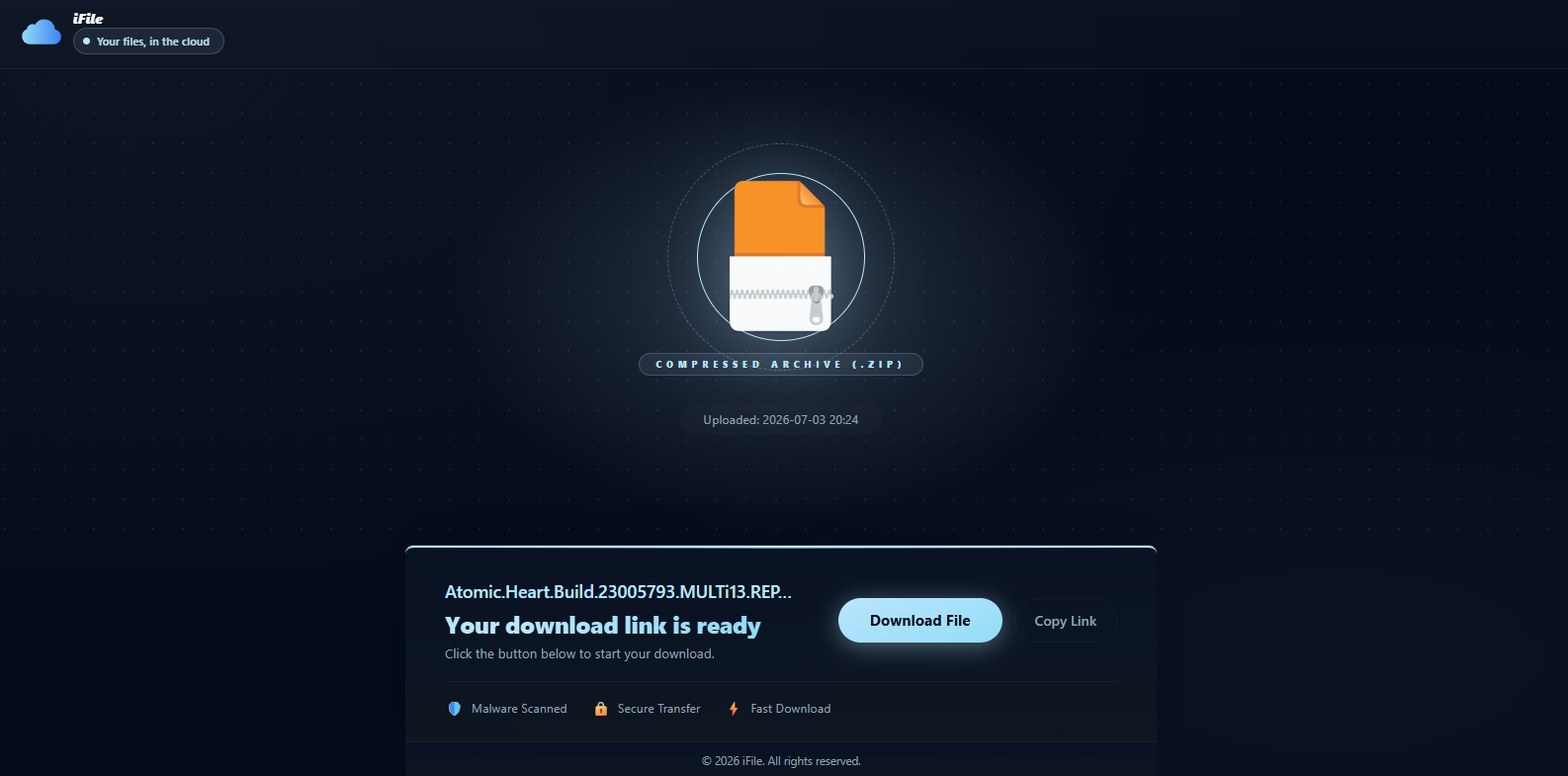
You will see that the file has same name as the game's repack but when I try to download the file, it's just a few kb/s or mb/s size which repack does not have, Most the repacks are large and these falsely named file are very small showing that they are a malware/virus instead of the actual repack.
Take Note: These fake archives don't always bear the same metadata or even filename as the original file you sought. Check these:
- The size displayed on the website you came from
- The size displayed on the filehost
- The size of the file you just downloaded
- If there's the slightest inconsistency - do NOT trust it even if it looks legit
Extra stuff to note too:
- Check the filename of the file displayed on the filehost
- Compare with what you downloaded
if there are any weird underscores or dashes introduced, you most difinitely downloaded a wrong file, don't panic, simply delete
- Any normal host downloads files in the same tab and doesn't need an extra page
- Always check the url address of the page you're downloading from
ie. IF you're expecting a file uploaded to sayy 'akirabox[.]to' , only download from that domain alone, don't settle for less
Now, sometimes there can be confusions if you're new in piracy, you can always scan the file you just downloaded in VirusTotal to be sure if the file is safe or not.
There can be a few other types of virus, a famous example being the renpy Virus which is pretty common to get nowadays regarding the recent mass malware campaign hitting warez and filehosts alike. so Even if stuffs like virus total can't detect it properly you have to use your common sense and check if there is any .py aka python files or any folders/files mentioning the name Renpy if a file has any of these, feel free to press Shift + Delete on that specific Folder!
If you Still don't understand, here is how a Renpy Virus folder often looks like:
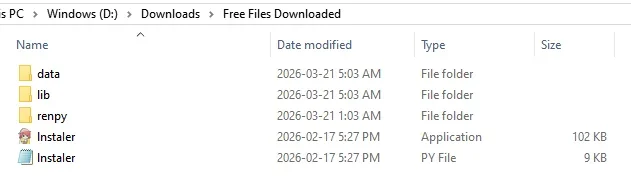
As you can see, it contains python scripts and renpy folder mentions which is very weird compared to what the average repack should have. and that should tell you that it's a malware and you should delete the entire folder as soon as Possible.
So, there will be always some People who will try to run that .exe despite countless warnings everywhere, so this is also how the .exe on the Ren'py virus actually looks like (or anything that looks similar):
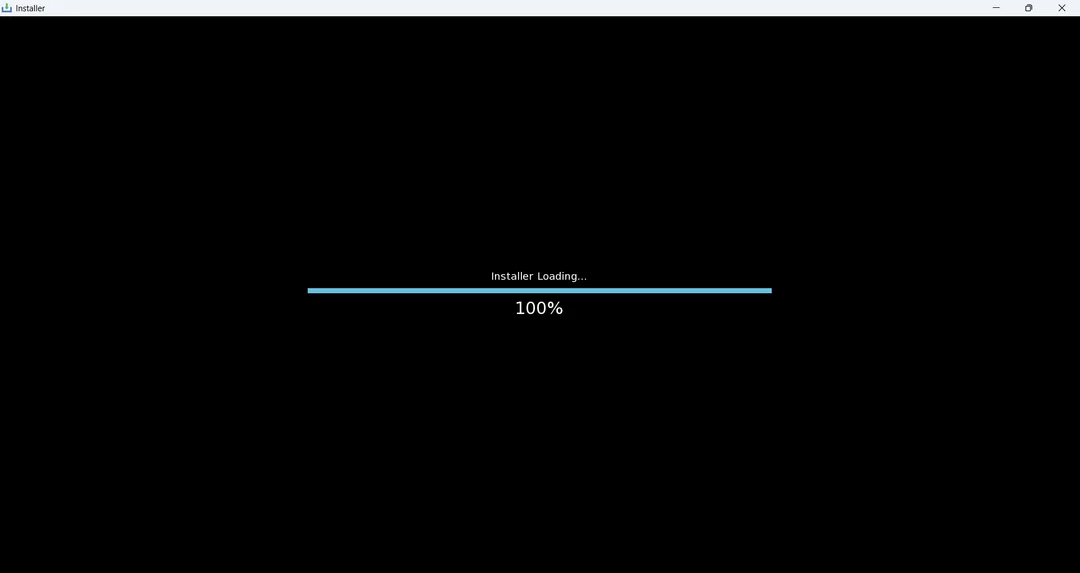
If run any executables that popped up this window anywhere, disconnect internet access immediately, use a powerful offline antivirus to first clean up the virus, then ultimately reinstall windows completely to be safe - PS: windows restore points often don't help here
If you never ran them, you're relatively safe - and don't ever run them
So This was All I wanted to teach and talk about, I hope the new generation of pirates will be better and smarter than us enough to detect malware and use tools like ublock to protect and keep their Pc clean!
If anyone have any doubts, or wants me to add any more info to this Post, feel free to make a reply post